
Android · Wear OS
Prayer times from your masjid, wherever you are
Reminders, prayer alarms, widgets and a Qibla compass, for any masjid on masjid247.com.
- Phone
- Android 7 or newer
- Watch
- Wear OS 3 or newer
- Home-screen widgets
- 13
- Watch faces
- 4
- Where to get it
- This page (not on Google Play)
- Prayer times from
- masjid247.com
What it does
-
Reminders
Adhān, jamāʿah and Jumuʿah, for every masjid you follow.
-
Prayer alarms
Rings like an alarm clock, even with the ringer on silent.
-
Any masjid
Search masjid247.com and follow as many as you like.
-
Widgets
13 for your home screen, each showing the masjid you choose.
-
Live audio
Hear the adhān live, where your masjid broadcasts it.
-
Qibla
A live compass pointing to the Kaʿbah.
How to install
- Tap Download for Android above.
- Open the downloaded
masjid247.apk. - If asked, allow Install unknown apps for your browser, then tap Install.
- Open the app, add your masjid, and tap Allow for notifications.
New versions install over the top. The app tells you when one is ready.
Wear OS
On your wrist
The next prayer with a live countdown, today's timetable, a tile, and reminders that vibrate even with your phone away.
Choose a watch face
-
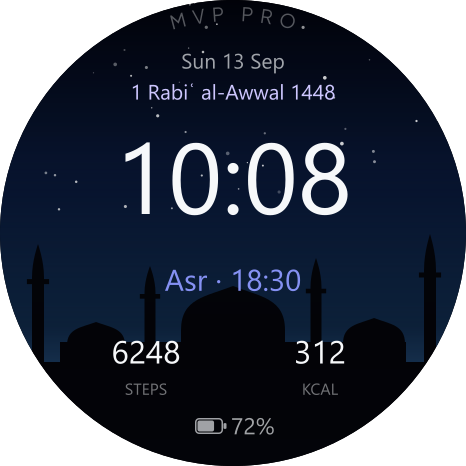
Scenic
Landscapes and masjids that change every half hour, with the Islamic date, next prayer, steps and battery.
Download · 104 KB -
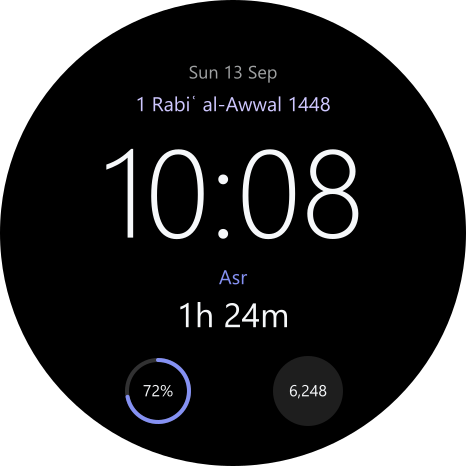
Minimal
True black with a big clock, the next prayer counting down, and three spaces along the bottom.
Download · 91 KB -
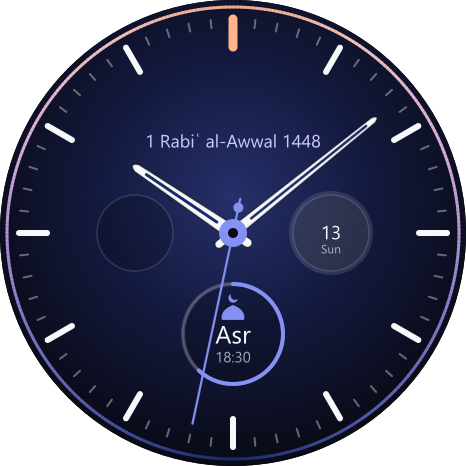
Classic
An analogue dial with the day-to-night ring, and a prayer sub-dial that fills as the next prayer nears.
Download · 223 KB -
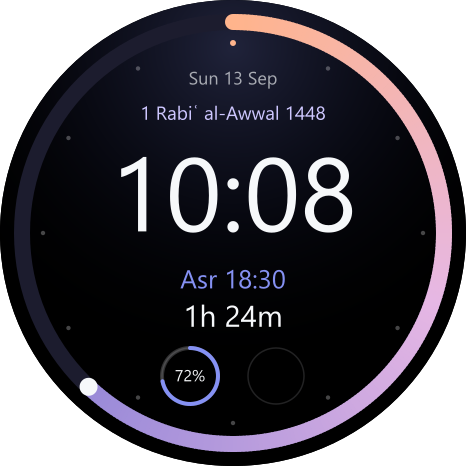
Orbit
The run-up to the next prayer drawn as a ring around the edge, with its jamāʿah time and a countdown.
Download · 139 KB
Make it yours. Every face has free spaces for your own complications, such as steps, heart rate or weather. Long-press the watch face, tap Customise (or Edit), then tap a space to choose what goes there. Minimal and Classic also let you pick an accent colour.
How to install on a watch
This part needs a computer once, because a phone app can't install onto a watch.
- On the watch: Settings → System → About, tap Build number seven times.
- Then Developer options → turn on ADB debugging and Debug over Wi-Fi. Note the IP and port it shows.
- On a computer on the same Wi-Fi, with Google's Android platform-tools:
adb connect <watch-ip>:<port>
adb install masjid247-watch.apk - Install each face you downloaded the same way, e.g.
adb install masjid247-watchface-minimal.apk - Long-press the watch face, swipe to the one you want and tap it.
Watch faces need Wear OS 4 or newer and show prayer times only when the watch app is installed. Install the phone app too: the watch gets your masaajid from it. The watch files don't update themselves, so check back here for new versions.
Questions
Is it on Google Play?
Not at the moment. Download it from this page and Android installs it like any other app. It checks this site for new versions and tells you when one is ready.
Will alarms ring when my phone is on silent?
Yes. Prayer alarms use Android's alarm sound, so they ring with the ringer on silent or vibrate. Do Not Disturb can still hold them back, and your alarm volume needs to be above zero.
Can I follow more than one masjid?
Yes. Add as many as you like, choose reminders for each one, and switch between them on the home screen. Each widget can show a different masjid.
Is there an iPhone version?
Not yet. Masjid 24/7 is for Android phones and Wear OS watches for now.
Where do the prayer times come from?
From each masjid's own timetable on masjid247.com, so the times match what your masjid publishes.